I recently came across a strange bug with Fluent Forms UI in the WordPress admin panel on a few of my client sites. Some (or sometimes most) forms wouldn’t appear at mydomain.com/wp-admin/admin.php?page=fluent_forms, even though they still existed.
At first, I assumed something had gone seriously wrong. I checked whether the forms were still rendering on the frontend—they were. Then I inspected the wp_fluentform_forms table in the database, which confirmed that all forms were still present.
I’m not entirely sure what causes this issue, but I did find a simple fix using Google Chrome:
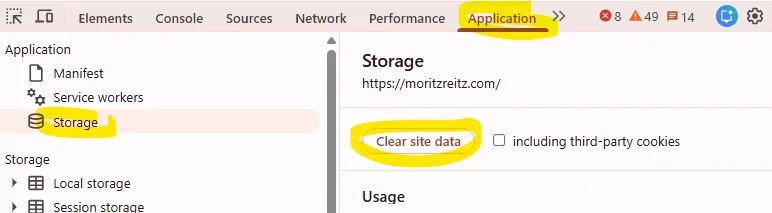
- Open the developer console (F12 or CTRL + I)
- Go to the Application tab
- Under Storage, click Clear site data
After doing this, the missing forms reappeared in the admin view.